I spent my first two years of blogging guessing what to write about. I’d pick a topic that felt interesting, write 1,500 words, hit publish, and wonder why nobody found it. The answer, every time, was the same — I hadn’t checked whether anyone was actually searching for it.
Keyword research changed that. But here’s the thing most guides won’t tell you — I didn’t need expensive tools to figure this out. The free tools available right now are genuinely powerful enough to build a solid keyword strategy, especially if you know how to use them together.
This is the workflow I wish someone had shown me early on. No $99/month subscriptions required.
Table of Contents
What Is Keyword Research?
Keyword research is the process of finding the specific words and phrases people type into search engines when looking for information, products, or answers. It tells you what your audience is already searching for so you can create content that meets them where they are.
Good keyword research doesn’t just hand you a list of words. It reveals what your readers actually want to know, how much competition you’re up against, and which topics give you the best chance of ranking.
Why Keyword Research Matters for Bloggers
Every blog post is a bet. You’re betting that someone out there wants the information you’re about to write. Keyword research removes the guesswork from that bet.
Without it, you might spend a week writing an in-depth guide on a topic nobody searches for. Or you might target a keyword so competitive that your article lands on page 15 and stays there. To tell you the truth – I’ve done both.
With even basic keyword research, you can find topics where real demand exists and competition is manageable. That’s the sweet spot — and free tools are more than enough to find it.
Step 1: Start With Google Search Console (Your Best Free Data)

If your blog has been live for even a few months, Google Search Console is the most valuable free keyword tool you have. Most guides list it as an afterthought. I think it should be your starting point.
Here’s why: Search Console shows you the actual queries people used to find your site. Not estimated data. Not ranges. Real search queries, with real impression counts and click-through rates.
How to Mine Keywords From Search Console
Log into Google Search Console and go to Performance > Search Results. Set the date range to the last 3 months. Now look at two things:
High impressions, low clicks. These are keywords where Google is already showing your content but people aren’t clicking. Your page might be ranking on page 2, or your title might not be compelling enough. Either way, you’ve found a keyword Google already associates with your site — you just need to push it over the line.
Keywords you didn’t target intentionally. Scroll through the query list and you’ll find searches you never optimized for but somehow rank for. These are gold. They tell you what Google thinks your content is about, and they often reveal article ideas you hadn’t considered.
I check MetaBlogue’s Search Console data at least once a month. Every time, I find queries that surprise me — searches I never planned for but could easily create content around.
The “Striking Distance” Technique
Filter your Search Console data for keywords where your average position is between 8 and 20. These are your “striking distance” keywords — close enough to page 1 that a focused effort could get them there.
For each one, ask yourself: does my existing article fully answer this query? If not, you’ve found either a section to add or a new article to write. This technique alone has given me more actionable keyword ideas than any paid tool.

Step 2: Validate and Explore With Google Trends
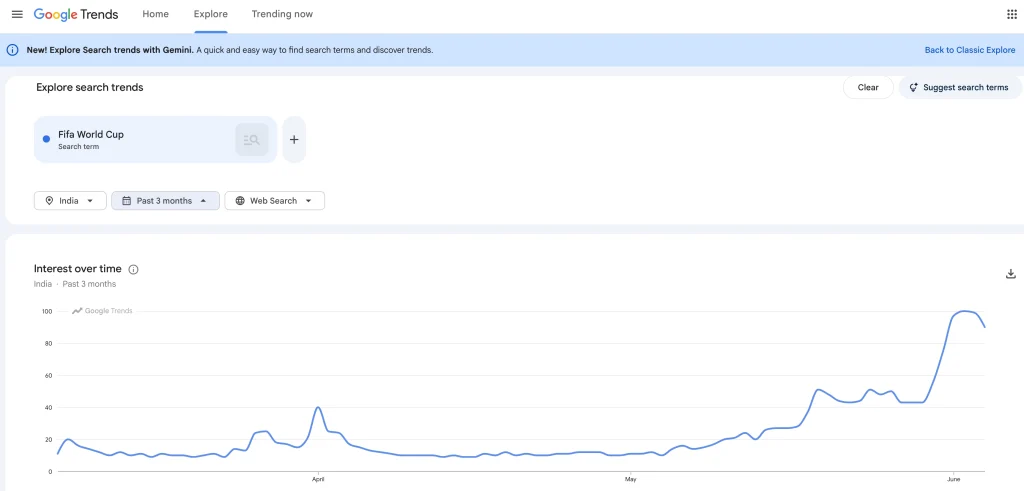
Once you have a list of potential keywords, Google Trends helps you figure out which ones are worth pursuing. It won’t give you exact search volumes, but it does something just as useful — it shows you whether interest is growing, stable, or dying.
How to Use Google Trends for Keyword Decisions
Type your keyword into Google Trends and set the timeframe to the past 12 months. You’re looking for three patterns:
- Rising steadily — This is the best signal. Growing interest means your article will get more traffic over time, not less.
- Flat and stable — Evergreen topics. These won’t spike, but they’ll deliver consistent traffic for years. Most “how to” queries fall here.
- Declining — Be cautious. If interest is dropping, make sure you understand why before investing time in an article.
The comparison feature is where Google Trends really shines. You can compare up to five keywords side by side. I use this constantly when I’m deciding between two similar article angles. For example, if I’m unsure whether to target “SEO tips for beginners” or “SEO basics for bloggers,” a quick comparison shows me which phrase has more consistent interest.
Spot Seasonal Patterns
Google Trends also reveals seasonal spikes. A keyword like “WordPress Black Friday deals” shows a massive spike every November and flatlines the rest of the year. Knowing this helps you plan content well in advance — publish your article in October, not November, so it has time to get indexed.
Step 3: Mine Google’s Own Search Features
Google gives away keyword ideas for free on every single search results page. Most bloggers scroll right past them.
Autocomplete Suggestions
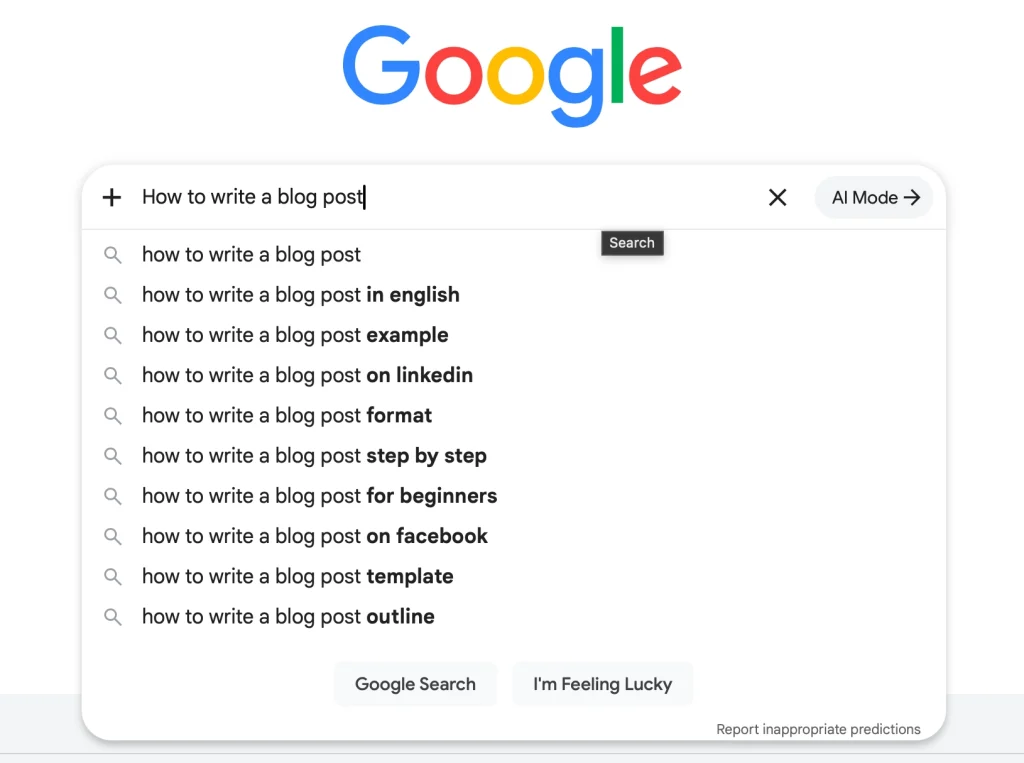
Start typing your topic into Google’s search bar and pause. The dropdown suggestions are real search queries that people actually type. Google surfaces them because they’re popular.
Here’s how I use this systematically. I type my seed keyword followed by each letter of the alphabet:
- “keyword research a…” → keyword research analytics, keyword research alternatives
- “keyword research b…” → keyword research blog, keyword research beginners
- “keyword research c…” → keyword research checklist, keyword research competition
This alphabet soup technique gives you dozens of real long-tail keyword ideas in under ten minutes. Write them all down — you’ll filter later.
People Also Ask Boxes
Almost every Google search now includes a “People Also Ask” section. These are questions real users ask about your topic. Each one is a potential H2 in your article or a standalone blog post.
Click on a question and more questions appear below it. Keep clicking and you’ll build a substantial list of related queries. I use these heavily when planning article structure — if Google’s own system says people ask these questions, I want my article to answer them.
Related Searches
Scroll to the bottom of any search results page and you’ll find “Related searches.” These are semantically connected queries that Google groups with your keyword. They’re excellent for finding secondary keywords and LSI terms to weave into your content naturally.

Long-Tail vs. Short-Tail Keywords: Know the Difference
Before you start evaluating keyword data, you need to understand the two types of keywords you’ll encounter — because the strategy for each is completely different.
Short-tail keywords are broad, high-volume phrases — usually one to two words. Think “keyword research” or “SEO tips.” They get thousands of searches per month, but the competition is fierce and the intent is vague. Someone searching “keyword research” could want a definition, a tool recommendation, a tutorial, or a career guide. You’re guessing.
Long-tail keywords are longer, more specific phrases — usually three to seven words. Think “how to do keyword research for a new blog” or “free keyword research tools for beginners.” They get fewer searches individually, but the intent is crystal clear. You know exactly what the reader wants, and you can write an article that nails it.
Here’s the part most guides skip: you don’t have to choose one or the other. The smarter approach is to start with long-tail keywords and let short-tail traffic come to you naturally.
When you write a thorough article targeting a long-tail keyword like “keyword research without paid tools,” Google doesn’t just rank you for that exact phrase. It recognises that your content is relevant to dozens of related queries — including shorter, broader ones like “keyword research” and “free keyword tools.” Over time, as your article builds authority and earns clicks, you’ll start appearing for those higher-volume terms without ever targeting them directly.
I’ve seen this play out on MetaBlogue multiple times. I’d target a specific long-tail phrase, check Search Console a few months later, and find the article ranking for short-tail variations I never optimized for. That’s Google’s semantic understanding doing the heavy lifting.
Step 4: Use Free Keyword Tools for Volume and Difficulty Data
The methods above give you keyword ideas, but they don’t tell you how many people search for each keyword or how hard it’ll be to rank. That’s where free keyword tools come in.
Google Keyword Planner
Google Keyword Planner is designed for advertisers, but it works perfectly for bloggers. You’ll need a Google Ads account to access it — though you don’t need to run any ads.
Enter your keyword and it’ll show you monthly search volume ranges (like 1K–10K), competition level, and related keyword suggestions. The volume ranges aren’t precise, but they’re enough to tell you whether a keyword gets 100 searches a month or 10,000.
One limitation to know: the “competition” column in Keyword Planner refers to advertising competition, not organic SEO difficulty. A keyword can show “Low” competition in Keyword Planner but be extremely competitive in organic search. Don’t confuse the two.
Ubersuggest
Ubersuggest gives you three free searches per day, which is enough if you’re strategic about it. What makes it useful is that it shows both search volume and an SEO difficulty score in one place — something Google Keyword Planner doesn’t do.
I use Ubersuggest primarily to check difficulty scores for keywords I’ve already identified through Search Console and Google’s search features. Don’t start your research here — start with the free methods above and use Ubersuggest to validate your top picks.
AnswerThePublic
AnswerThePublic visualizes questions people ask about any topic. Enter a keyword and it generates a map of questions organized by who, what, when, where, why, and how.
The free tier limits you to a few searches per day, but each search gives you dozens of question-based keywords. These are particularly valuable for blog content because question keywords tend to have clear intent — you know exactly what the reader wants.
Keyword Surfer (Chrome Extension)
This one deserves more attention than it gets. Keyword Surfer is a free Chrome extension that shows search volume data directly in your Google search results. No switching between tabs. No separate tools.
Every time you search for something in Google, Keyword Surfer displays the estimated monthly search volume right in the search bar and shows related keyword suggestions in a sidebar panel. I keep this extension installed permanently — it turns every Google search into passive keyword research.

Step 5: Evaluate Keywords Without Paid Tools
Paid tools give you neat difficulty scores on a scale of 1 to 100. Without them, you need to evaluate competition manually. But honestly, the manual approach often gives you better insight.
The SERP Check Method
Search for your target keyword in an incognito browser window and study the first page of results. Ask yourself these questions:
Who is ranking? If the top 10 results are all from sites like Forbes, HubSpot, and Moz, that keyword is going to be tough for a smaller blog. But if you see other independent bloggers, niche sites, or forum threads ranking — that’s your opening.
How good is the content? Read the top 3 results. Are they thorough and well-written, or are they thin and outdated? If you can genuinely create something more useful, you have a chance regardless of domain authority.
Are there featured snippets? If Google shows a featured snippet for the keyword, that’s an opportunity. Snippets can pull content from any position on page 1, and well-formatted answers from smaller sites can earn snippet placement over bigger competitors.
Volume vs. Difficulty: Finding the Sweet Spot
Here’s the framework I use. For a blog that’s still building authority, the ideal keywords sit in this range:
| Factor | Target Range |
|---|---|
| Monthly search volume | 100–1,000 |
| SERP competition | Independent blogs or niche sites in the top 10 |
| Content quality | Existing top results are thin, outdated, or incomplete |
| Search intent | Informational (the person wants to learn, not buy) |
Don’t chase keywords with 50,000 monthly searches when you’re starting out. A keyword with 300 searches a month that you can actually rank for will bring more traffic than a keyword with 50,000 searches where you’re stuck on page 8.
Why Your SEO Plugin’s Keyword Score Doesn’t Tell the Full Story
This is something I wish I’d understood earlier. If you use an SEO plugin like RankMath or Yoast, you’ve seen the keyword analysis panel — it checks whether your focus keyword appears in the title, headings, first paragraph, and throughout the content. If it doesn’t find the exact phrase, it flags it orange or red.
Here’s the problem: that’s not how Google works anymore.
Google’s algorithms have understood semantic meaning for years. If your target keyword is “keyword research without paid tools,” Google knows that “finding keywords using free tools,” “how to research keywords without spending money,” and “free keyword research for bloggers” all mean essentially the same thing. It groups them under the same search intent and ranks your page for all of them — even if you only used the exact phrase once.
But RankMath doesn’t know that. It’s doing a literal string match. So you might have a perfectly optimized article that scores 60/100 in your SEO plugin simply because you used natural variations instead of repeating the exact focus keyword five times.
I’ve fallen into this trap myself. I’d rewrite perfectly natural sentences just to squeeze the exact keyword in and turn that indicator green. The result? Awkward, repetitive content that read worse than the original. The myth that keyword stuffing helps your rankings is partly fueled by these plugin scores nudging you toward unnatural repetition.
My approach now: I set the focus keyword in RankMath, glance at the structural checks (is it in the title? the meta description? the first paragraph?), and then ignore the density score entirely. I write naturally, use variations, and let Google figure out the semantics. It has been doing this well since the BERT update in 2019 — the SEO plugins just haven’t caught up.
This matters especially for long-tail keywords. A phrase like “how to do keyword research for a new blog without expensive tools” has dozens of natural variations. Trying to repeat that exact 12-word phrase multiple times in an article would sound absurd. Use the core idea, vary the phrasing, and trust that Google will connect the dots.

Step 6: Build a Simple Keyword Tracking Workflow
Research without organization is just busywork. You need a system to capture, evaluate, and prioritize your keyword ideas.
Set Up a Keyword Spreadsheet
I keep a simple spreadsheet with these columns:
| Keyword | Source | Est. Volume | Difficulty (Manual) | Intent | Status |
|---|---|---|---|---|---|
| keyword research free tools | Search Console | 500–1K | Medium — niche blogs ranking | Informational | Draft planned |
| how to find blog topics | Autocomplete | 1K–5K | Low — thin content in top 10 | Informational | To research |
| best SEO plugins WordPress | People Also Ask | 1K–5K | High — authority sites dominate | Commercial | Skip for now |
Source tells you where you found the keyword. Difficulty is your manual SERP assessment, not a tool score. Intent helps you match the keyword to the right type of article. Status keeps you from losing track of ideas.
The Monthly Keyword Research Routine
I’ve settled into a rhythm that takes about an hour once a month:
- Check Search Console for new queries, striking distance keywords, and unexpected rankings.
- Run your top 3–5 ideas through Google Trends to confirm interest is stable or growing.
- Do a SERP check for each keyword to manually assess competition.
- Validate volume using Ubersuggest or Keyword Planner for your strongest candidates.
- Update your spreadsheet and pick 2–3 keywords to target in the coming month.
That’s it. No all-day research sessions. No analysis paralysis. One focused hour, once a month, keeps your content strategy data-driven without overwhelming you.
Step 7: Continuous Keyword Optimization — Let Your Data Guide You
Keyword research doesn’t end when you hit publish. The real gains come from what you do in the weeks and months after.
This is where the long-tail strategy from earlier pays off. You published an article targeting a specific long-tail keyword. Now it’s time to watch what actually happens in Search Console — and use that data to expand your reach.
Monitor Short-Tail Emergence
About 4–6 weeks after publishing, go back to Search Console and filter the Performance report for that specific page. Look at the full list of queries driving impressions.
You’ll almost always find surprises. Your article targeting “keyword research without paid tools” might be picking up impressions for “keyword research,” “how to do keyword research,” or “free SEO tools.” These are shorter, higher-volume terms that Google has started associating with your content.
Don’t rush to optimize for them. First, note where you’re ranking. If you’re already at positions 15–25 for a short-tail term, you’ve got momentum. A targeted update can push you onto page 1.
Optimize Strategically, Not Reactively
When Search Console shows you’re gaining traction for a broader keyword, you have three options:
- Strengthen the existing article. Add a section that directly addresses the short-tail query. If you’re ranking for “keyword research” but your article is titled “keyword research without paid tools,” adding a broader introductory section about keyword research fundamentals helps Google see the page as relevant for both queries.
- Improve the title and meta description. Sometimes a small tweak brings a big jump. If your article is sitting at position 12 for a promising short-tail keyword, adjusting the title tag to include that broader term — while keeping it natural — can be enough to move onto page 1.
- Create a new article. If a short-tail keyword is genuinely broad enough to deserve its own dedicated piece, write one. Then link between the two articles. Your original long-tail article becomes supporting content that strengthens the new article’s authority through internal linking.
The Continuous Optimization Loop
Think of keyword optimization as a loop, not a line:
- Publish targeting a long-tail keyword.
- Wait 4–6 weeks for Google to index and rank the page.
- Review Search Console data for emerging short-tail queries.
- Decide — strengthen the existing article, tweak the title, or spin off a new post.
- Repeat every quarter for your best-performing content.
This approach is what separates blogs that plateau from blogs that compound their traffic over time. Your early articles aren’t just standalone pieces — they’re reconnaissance missions that reveal what Google thinks you’re an authority on.
I revisit my top 10 articles in Search Console every quarter. Almost every time, I find a new keyword opportunity hiding in the impression data — a short-tail term that I can now realistically compete for because the long-tail article already did the groundwork.
When Free Tools Aren’t Enough
I want to be honest about limitations. Free tools have real constraints — Ubersuggest limits daily searches, Keyword Planner shows volume ranges instead of exact numbers, and none of them offer the backlink analysis or content gap features that paid tools like Ahrefs or Semrush provide.
If your blog is generating revenue and SEO is a core growth channel, paid tools will eventually save you time. But I ran MetaBlogue on free tools alone for a long time, and the keyword data was solid enough to build consistent organic traffic. The workflow matters more than the tool.
If you’re spending zero on keyword research right now, going from zero to free tools is a much bigger jump than going from free to paid. Start here.
FAQ’s on Keyword Research
What is the best free keyword research tool for bloggers?
Google Search Console is the best free keyword research tool for bloggers who already have a live site. It shows the actual queries driving impressions and clicks to your content — real data, not estimates. For bloggers without existing traffic, Google Keyword Planner combined with autocomplete mining gives you the strongest starting point at zero cost.
How accurate are free keyword research tools?
Free keyword research tools provide directionally accurate data that’s reliable enough for content planning decisions. Google Keyword Planner shows volume ranges rather than exact numbers, and Ubersuggest’s difficulty scores are estimates. But for choosing between writing Article A or Article B, the data is more than sufficient. Exact precision matters less than picking the right topics.
How many keywords should I target per blog post?
One primary keyword and two to four secondary keywords per blog post is the standard approach. Your primary keyword should appear in the title, first 100 words, and at least one heading. Secondary keywords should fit naturally into the body text. Forcing additional keywords into a single post usually hurts readability without helping rankings.
Can I rank on Google without doing keyword research?
Ranking on Google without keyword research is possible but inefficient. You might accidentally write about a topic people search for, but you’ll miss opportunities to target keywords where you have a realistic chance of ranking. Even 30 minutes of basic research — checking Search Console and scanning autocomplete suggestions — dramatically improves your odds of creating content that gets found.
Is keyword research different for AI search engines like Perplexity and ChatGPT?
Keyword research for AI search engines follows the same foundation — find what people ask and create thorough, authoritative answers. The difference is in how you write the answer. AI engines favour clear, declarative statements and well-structured content that can be easily extracted and cited. If you’re doing keyword research and writing well for Google, you’re already doing most of what AI search engines need. I cover this in more depth in the AEO article in the WordPress Speed & SEO series.