Star ratings on search results stop the scroll. They build instant credibility and boost click-through rates before a visitor even lands on your page.
If you run a review site — or just want to add editorial ratings to product roundups and tool comparisons — you need a review box that looks polished and outputs valid schema markup. Most review plugins are bloated, rigid, or load scripts you don’t need.
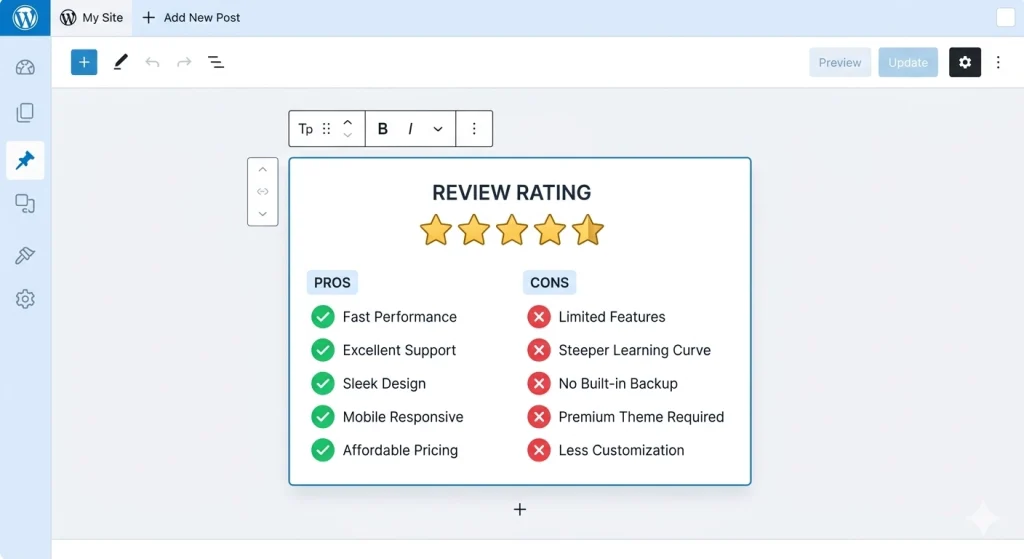
This guide walks you through building a lightweight editor review rating box from scratch using MetaBox for the data layer and GenerateBlocks for the visual layout. You’ll get complete, copy-paste-ready code for the field group, display template, CSS styling, and Review schema JSON-LD.
Table of Contents
What You’ll Need Before Starting
Make sure these plugins are active on your WordPress site:
- Meta Box (free core plugin) — for creating the review custom fields
- Meta Box Builder (premium) — optional, only if you prefer the GUI over PHP code
- GenerateBlocks (free version works) — for building the review box layout
- GeneratePress theme (recommended but not required)
You’ll also add a small PHP snippet to your theme’s functions.php file (or a site-specific plugin) for the star rendering and schema output.
Step 1: Register the Review Fields in MetaBox
First, let’s create the custom fields that store your review data. Add this PHP code to your child theme’s functions.php or a custom plugin file.
MetaBox Field Group — PHP Code
add_filter( 'rwmb_meta_boxes', 'mb_review_box_fields' );
function mb_review_box_fields( $meta_boxes ) {
    $meta_boxes[] = [
        'title'      => 'Editor Review Box',
        'id'         => 'editor-review-box',
        'post_types' => ['post', 'page'],
        'context'    => 'normal',
        'priority'   => 'high',
        'fields'     => [
            [
                'name' => 'Enable Review Box',
                'id'   => 'review_enabled',
                'type' => 'switch',
                'desc' => 'Toggle to show the review box on this post.',
            ],
            [
                'name'        => 'Reviewed Item Name',
                'id'          => 'review_item_name',
                'type'        => 'text',
                'placeholder' => 'e.g. Bluehost Web Hosting',
                'visible'     => ['review_enabled', true],
            ],
            [
                'name'       => 'Overall Rating',
                'id'         => 'review_rating',
                'type'       => 'number',
                'min'        => 0,
                'max'        => 5,
                'step'       => 0.5,
                'desc'       => 'Rate from 0 to 5 (half-star increments allowed).',
                'visible'    => ['review_enabled', true],
            ],
            [
                'name'        => 'Review Summary',
                'id'          => 'review_summary',
                'type'        => 'textarea',
                'rows'        => 3,
                'placeholder' => 'A brief editorial summary of your verdict.',
                'visible'     => ['review_enabled', true],
            ],
            [
                'name'    => 'Pros',
                'id'      => 'review_pros',
                'type'    => 'text',
                'clone'   => true,
                'desc'    => 'Add one pro per line. Click + to add more.',
                'visible' => ['review_enabled', true],
            ],
            [
                'name'    => 'Cons',
                'id'      => 'review_cons',
                'type'    => 'text',
                'clone'   => true,
                'desc'    => 'Add one con per line. Click + to add more.',
                'visible' => ['review_enabled', true],
            ],
        ],
    ];

    return $meta_boxes;
}
This code creates a clean meta box in your post editor with six fields. The switch field lets you toggle the review box per post — no review data cluttering for posts that don’t need it.
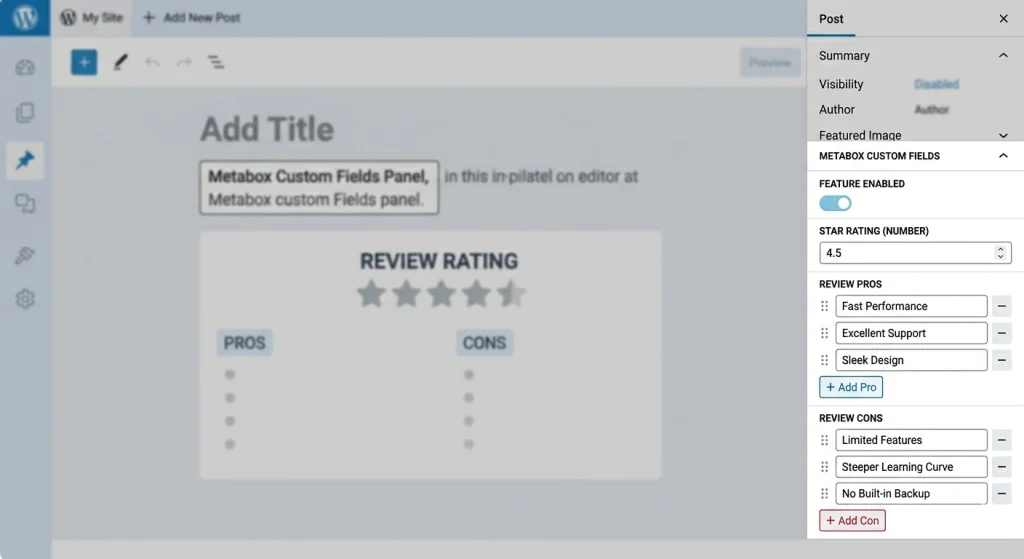
The clone => true setting on Pros and Cons gives you repeatable text inputs. Click the + button in the editor to add as many items as you need.
What Each Field Stores
| Field ID | Type | Purpose |
|---|---|---|
review_enabled | Switch | Show/hide the review box |
review_item_name | Text | Name of the product or service being reviewed |
review_rating | Number | Overall score from 0 to 5 |
review_summary | Textarea | Short editorial verdict |
review_pros | Cloneable text | List of advantages |
review_cons | Cloneable text | List of disadvantages |
Step 2: Create the Star Rating Helper and Review Box Shortcode
GenerateBlocks pulls dynamic content from post meta fields beautifully for text and images. But star ratings need HTML transformation — a number like 4.5 needs to become five star icons with the correct fill.
The cleanest approach: register a shortcode that renders the entire review box, then place it inside a GenerateBlocks layout.
Add this to your functions.php:
/**
* Render star icons from a numeric rating.
*/
function mb_render_stars( $rating ) {
$rating = floatval( $rating );
$output = '<div class="review-stars" aria-label="Rating: ' . $rating . ' out of 5">';
for ( $i = 1; $i <= 5; $i++ ) {
if ( $rating >= $i ) {
$output .= '<span class="star full">★</span>';
} elseif ( $rating >= $i - 0.5 ) {
$output .= '<span class="star half">★</span>';
} else {
$output .= '<span class="star empty">☆</span>';
}
}
$output .= '<span class="rating-number">' . number_format( $rating, 1 ) . ' / 5</span>';
$output .= '</div>';
return $output;
}
/**
* [editor_review_box] shortcode — renders the complete review box.
*/
function mb_editor_review_box_shortcode( $atts ) {
$post_id = get_the_ID();
$enabled = rwmb_meta( 'review_enabled', [], $post_id );
if ( ! $enabled ) {
return '';
}
$item_name = rwmb_meta( 'review_item_name', [], $post_id );
$rating = rwmb_meta( 'review_rating', [], $post_id );
$summary = rwmb_meta( 'review_summary', [], $post_id );
$pros = rwmb_meta( 'review_pros', [], $post_id );
$cons = rwmb_meta( 'review_cons', [], $post_id );
if ( ! $item_name || ! $rating ) {
return '';
}
ob_start();
?>
<div class="gb-review-box">
<div class="review-box-header">
<h3 class="review-box-title"><?php echo esc_html( $item_name ); ?></h3>
<?php echo mb_render_stars( $rating ); ?>
</div>
<?php if ( $summary ) : ?>
<div class="review-box-summary">
<p><?php echo esc_html( $summary ); ?></p>
</div>
<?php endif; ?>
<div class="review-box-columns">
<?php if ( ! empty( $pros ) ) : ?>
<div class="review-box-pros">
<h4>Pros</h4>
<ul>
<?php foreach ( (array) $pros as $pro ) : ?>
<?php if ( ! empty( $pro ) ) : ?>
<li><?php echo esc_html( $pro ); ?></li>
<?php endif; ?>
<?php endforeach; ?>
</ul>
</div>
<?php endif; ?>
<?php if ( ! empty( $cons ) ) : ?>
<div class="review-box-cons">
<h4>Cons</h4>
<ul>
<?php foreach ( (array) $cons as $con ) : ?>
<?php if ( ! empty( $con ) ) : ?>
<li><?php echo esc_html( $con ); ?></li>
<?php endif; ?>
<?php endforeach; ?>
</ul>
</div>
<?php endif; ?>
</div>
</div>
<?php
return ob_get_clean();
}
add_shortcode( 'editor_review_box', 'mb_editor_review_box_shortcode' );
Now you can drop [editor_review_box] into any post to render the review box.
Step 3: Build the Layout With GenerateBlocks
Open the post where you want the review box. Here’s how to set it up in the block editor using GenerateBlocks:
- Add a GenerateBlocks Container block where you want the review box (typically after the introduction or at the end of the post).
- Set the CSS class on the Container to
review-box-wrapperunder Advanced > CSS Classes. This gives you a styling hook. - Inside the Container, add a Shortcode block (core WordPress block) and type
[editor_review_box]. - Save and preview the post.
Using GenerateBlocks for the Wrapper Styling
The Container block from GenerateBlocks gives you control over padding, background, borders, and responsive breakpoints directly in the editor. Configure the Container with these settings:
- Padding: 0px (the shortcode output handles internal spacing via CSS)
- Background: leave empty (CSS handles it)
- Border radius: 8px
- Border: 1px solid — pick a light grey like
#e0e0e0
This approach keeps your review data in MetaBox, your layout in GenerateBlocks, and your display logic in a clean shortcode.
Alternative: Fully Dynamic GenerateBlocks Layout
If you prefer building the entire review box with GenerateBlocks blocks instead of a shortcode, you can use GenerateBlocks’ dynamic data feature. Set each Headline block’s content source to Post Meta and enter the MetaBox field ID (like review_summary or review_item_name).
Important: For MetaBox fields to appear in GenerateBlocks’ dynamic data dropdown, you need to expose them to the REST API. Add this to your functions.php:
add_filter( 'rwmb_meta_boxes', 'mb_review_box_rest_support', 20 );
function mb_review_box_rest_support( $meta_boxes ) {
    foreach ( $meta_boxes as &$meta_box ) {
        if ( isset( $meta_box['id'] ) && $meta_box['id'] === 'editor-review-box' ) {
            foreach ( $meta_box['fields'] as &$field ) {
                $field['show_in_rest'] = true;
            }
        }
    }
    return $meta_boxes;
}
This registers all review fields with the WordPress REST API so GenerateBlocks can find them.

Step 4: Style the Editor Review Rating Box With CSS
Add this CSS to your theme’s Customizer > Additional CSS panel, or to your child theme’s style.css:
/* ── Review Box Container ── */
.gb-review-box {
    background: #ffffff;
    border: 2px solid #e2e8f0;
    border-radius: 12px;
    padding: 32px;
    margin: 40px 0;
    box-shadow: 0 1px 3px rgba(0, 0, 0, 0.08);
    font-family: inherit;
}

/* ── Header: Title + Stars ── */
.review-box-header {
    text-align: center;
    margin-bottom: 24px;
    padding-bottom: 20px;
    border-bottom: 1px solid #f1f5f9;
}

.review-box-title {
    font-size: 1.5rem;
    font-weight: 700;
    margin: 0 0 12px 0;
    color: #1a202c;
}

/* ── Star Rating ── */
.review-stars {
    display: flex;
    align-items: center;
    justify-content: center;
    gap: 4px;
    font-size: 1.5rem;
    line-height: 1;
}

.review-stars .star.full {
    color: #f59e0b;
}

.review-stars .star.half {
    color: #f59e0b;
    position: relative;
}

.review-stars .star.half::after {
    content: '☆';
    position: absolute;
    left: 0;
    top: 0;
    color: #d1d5db;
    clip-path: inset(0 0 0 50%);
}

.review-stars .star.empty {
    color: #d1d5db;
}

.review-stars .rating-number {
    font-size: 0.95rem;
    font-weight: 600;
    color: #64748b;
    margin-left: 8px;
}

/* ── Summary ── */
.review-box-summary {
    background: #f8fafc;
    border-radius: 8px;
    padding: 16px 20px;
    margin-bottom: 24px;
}

.review-box-summary p {
    margin: 0;
    font-size: 1rem;
    line-height: 1.7;
    color: #334155;
}

/* ── Pros/Cons Columns ── */
.review-box-columns {
    display: grid;
    grid-template-columns: 1fr 1fr;
    gap: 24px;
}

.review-box-pros h4,
.review-box-cons h4 {
    font-size: 1rem;
    font-weight: 700;
    text-transform: uppercase;
    letter-spacing: 0.05em;
    margin: 0 0 12px 0;
}

.review-box-pros h4 {
    color: #16a34a;
}

.review-box-cons h4 {
    color: #dc2626;
}

.review-box-pros ul,
.review-box-cons ul {
    list-style: none;
    margin: 0;
    padding: 0;
}

.review-box-pros li,
.review-box-cons li {
    position: relative;
    padding-left: 24px;
    margin-bottom: 8px;
    font-size: 0.95rem;
    line-height: 1.6;
    color: #475569;
}

.review-box-pros li::before {
    content: '✓';
    position: absolute;
    left: 0;
    font-weight: 700;
    color: #16a34a;
}

.review-box-cons li::before {
    content: '✗';
    position: absolute;
    left: 0;
    font-weight: 700;
    color: #dc2626;
}

/* ── Responsive ── */
@media (max-width: 600px) {
    .gb-review-box {
        padding: 20px;
    }

    .review-box-columns {
        grid-template-columns: 1fr;
        gap: 16px;
    }

    .review-stars {
        font-size: 1.25rem;
    }
}
This gives you a clean, modern review box with green checkmarks for pros and red crosses for cons. The two-column layout collapses to a single column on mobile.
Step 5: Add Review Schema Markup (JSON-LD)
This is the part that gets your star ratings showing up in Google search results. Add this PHP to your functions.php:
add_action( 'wp_head', 'mb_review_schema_markup' );
function mb_review_schema_markup() {
    if ( ! is_singular() ) {
        return;
    }

    $post_id = get_the_ID();
    $enabled = rwmb_meta( 'review_enabled', [], $post_id );

    if ( ! $enabled ) {
        return;
    }

    $item_name = rwmb_meta( 'review_item_name', [], $post_id );
    $rating    = rwmb_meta( 'review_rating', [], $post_id );
    $summary   = rwmb_meta( 'review_summary', [], $post_id );

    if ( ! $item_name || ! $rating ) {
        return;
    }

    $schema = [
        '@context' => 'https://schema.org',
        '@type'    => 'Review',
        'name'     => get_the_title( $post_id ),
        'reviewBody' => wp_strip_all_tags( $summary ),
        'author'   => [
            '@type' => 'Person',
            'name'  => get_the_author_meta( 'display_name', get_post_field( 'post_author', $post_id ) ),
        ],
        'datePublished' => get_the_date( 'c', $post_id ),
        'itemReviewed'  => [
            '@type' => 'Thing',
            'name'  => $item_name,
        ],
        'reviewRating' => [
            '@type'       => 'Rating',
            'ratingValue' => number_format( floatval( $rating ), 1 ),
            'bestRating'  => '5',
            'worstRating' => '1',
        ],
    ];

    $pros = rwmb_meta( 'review_pros', [], $post_id );
    $cons = rwmb_meta( 'review_cons', [], $post_id );

    if ( ! empty( $pros ) ) {
        $schema['positiveNotes'] = [
            '@type'         => 'ItemList',
            'itemListElement' => array_values( array_map( function( $pro, $i ) {
                return [
                    '@type'    => 'ListItem',
                    'position' => $i + 1,
                    'name'     => $pro,
                ];
            }, array_filter( (array) $pros ), array_keys( array_filter( (array) $pros ) ) ) ),
        ];
    }

    if ( ! empty( $cons ) ) {
        $schema['negativeNotes'] = [
            '@type'         => 'ItemList',
            'itemListElement' => array_values( array_map( function( $con, $i ) {
                return [
                    '@type'    => 'ListItem',
                    'position' => $i + 1,
                    'name'     => $con,
                ];
            }, array_filter( (array) $cons ), array_keys( array_filter( (array) $cons ) ) ) ),
        ];
    }

    echo '<script type="application/ld+json">' . wp_json_encode( $schema, JSON_UNESCAPED_SLASHES | JSON_UNESCAPED_UNICODE | JSON_PRETTY_PRINT ) . '</script>' . "\n";
}
This outputs a complete Review schema object with positiveNotes and negativeNotes — the structured pros/cons format Google introduced for review rich results.

The schema pulls the author name, publish date, rating, and review body directly from your MetaBox fields and WordPress post data.

Step 6: Test Your Schema Markup
After publishing a post with the review box enabled, validate your structured data:
- Open Google’s Rich Results Test.
- Enter your post URL and run the test.
- Look for the Review result type with a green checkmark.
- Verify the star rating, item name, author, and pros/cons all appear correctly.
You can also paste your page URL into the Schema Markup Validator for a more detailed breakdown of the JSON-LD output.
Common issues to watch for:
- Missing
review_item_namecauses the schema to not render at all (by design — incomplete data is worse than no data). - If you see warnings about
itemReviewed, change the@typefromThingto something more specific likeProduct,SoftwareApplication, orBookdepending on what you review.
Complete functions.php Snippet (All-in-One)
For convenience, here’s everything combined into a single snippet you can paste into your child theme’s functions.php:
<?php
/**
* Editor Review Box — MetaBox + GenerateBlocks
* Adds custom fields, shortcode output, and Review schema markup.
*/
// 1. Register MetaBox fields
add_filter( 'rwmb_meta_boxes', 'mb_review_box_fields' );
function mb_review_box_fields( $meta_boxes ) {
$meta_boxes[] = [
'title' => 'Editor Review Box',
'id' => 'editor-review-box',
'post_types' => ['post', 'page'],
'context' => 'normal',
'priority' => 'high',
'fields' => [
[
'name' => 'Enable Review Box',
'id' => 'review_enabled',
'type' => 'switch',
],
[
'name' => 'Reviewed Item Name',
'id' => 'review_item_name',
'type' => 'text',
'placeholder' => 'e.g. Bluehost Web Hosting',
'visible' => ['review_enabled', true],
],
[
'name' => 'Overall Rating',
'id' => 'review_rating',
'type' => 'number',
'min' => 0,
'max' => 5,
'step' => 0.5,
'visible' => ['review_enabled', true],
],
[
'name' => 'Review Summary',
'id' => 'review_summary',
'type' => 'textarea',
'rows' => 3,
'visible' => ['review_enabled', true],
],
[
'name' => 'Pros',
'id' => 'review_pros',
'type' => 'text',
'clone' => true,
'visible' => ['review_enabled', true],
],
[
'name' => 'Cons',
'id' => 'review_cons',
'type' => 'text',
'clone' => true,
'visible' => ['review_enabled', true],
],
],
];
return $meta_boxes;
}
// 2. REST API support for GenerateBlocks dynamic data
add_filter( 'rwmb_meta_boxes', 'mb_review_box_rest_support', 20 );
function mb_review_box_rest_support( $meta_boxes ) {
foreach ( $meta_boxes as &$meta_box ) {
if ( isset( $meta_box['id'] ) && $meta_box['id'] === 'editor-review-box' ) {
foreach ( $meta_box['fields'] as &$field ) {
$field['show_in_rest'] = true;
}
}
}
return $meta_boxes;
}
// 3. Star rating renderer
function mb_render_stars( $rating ) {
$rating = floatval( $rating );
$output = '<div class="review-stars" aria-label="Rating: ' . $rating . ' out of 5">';
for ( $i = 1; $i <= 5; $i++ ) {
if ( $rating >= $i ) {
$output .= '<span class="star full">★</span>';
} elseif ( $rating >= $i - 0.5 ) {
$output .= '<span class="star half">★</span>';
} else {
$output .= '<span class="star empty">☆</span>';
}
}
$output .= '<span class="rating-number">' . number_format( $rating, 1 ) . ' / 5</span>';
$output .= '</div>';
return $output;
}
// 4. Review box shortcode
function mb_editor_review_box_shortcode( $atts ) {
$post_id = get_the_ID();
$enabled = rwmb_meta( 'review_enabled', [], $post_id );
if ( ! $enabled ) {
return '';
}
$item_name = rwmb_meta( 'review_item_name', [], $post_id );
$rating = rwmb_meta( 'review_rating', [], $post_id );
$summary = rwmb_meta( 'review_summary', [], $post_id );
$pros = rwmb_meta( 'review_pros', [], $post_id );
$cons = rwmb_meta( 'review_cons', [], $post_id );
if ( ! $item_name || ! $rating ) {
return '';
}
ob_start();
?>
<div class="gb-review-box">
<div class="review-box-header">
<h3 class="review-box-title"><?php echo esc_html( $item_name ); ?></h3>
<?php echo mb_render_stars( $rating ); ?>
</div>
<?php if ( $summary ) : ?>
<div class="review-box-summary">
<p><?php echo esc_html( $summary ); ?></p>
</div>
<?php endif; ?>
<div class="review-box-columns">
<?php if ( ! empty( $pros ) ) : ?>
<div class="review-box-pros">
<h4>Pros</h4>
<ul>
<?php foreach ( (array) $pros as $pro ) : ?>
<?php if ( ! empty( $pro ) ) : ?>
<li><?php echo esc_html( $pro ); ?></li>
<?php endif; ?>
<?php endforeach; ?>
</ul>
</div>
<?php endif; ?>
<?php if ( ! empty( $cons ) ) : ?>
<div class="review-box-cons">
<h4>Cons</h4>
<ul>
<?php foreach ( (array) $cons as $con ) : ?>
<?php if ( ! empty( $con ) ) : ?>
<li><?php echo esc_html( $con ); ?></li>
<?php endif; ?>
<?php endforeach; ?>
</ul>
</div>
<?php endif; ?>
</div>
</div>
<?php
return ob_get_clean();
}
add_shortcode( 'editor_review_box', 'mb_editor_review_box_shortcode' );
// 5. Review schema JSON-LD
add_action( 'wp_head', 'mb_review_schema_markup' );
function mb_review_schema_markup() {
if ( ! is_singular() ) {
return;
}
$post_id = get_the_ID();
$enabled = rwmb_meta( 'review_enabled', [], $post_id );
if ( ! $enabled ) {
return;
}
$item_name = rwmb_meta( 'review_item_name', [], $post_id );
$rating = rwmb_meta( 'review_rating', [], $post_id );
$summary = rwmb_meta( 'review_summary', [], $post_id );
if ( ! $item_name || ! $rating ) {
return;
}
$schema = [
'@context' => 'https://schema.org',
'@type' => 'Review',
'name' => get_the_title( $post_id ),
'reviewBody' => wp_strip_all_tags( $summary ),
'author' => [
'@type' => 'Person',
'name' => get_the_author_meta( 'display_name', get_post_field( 'post_author', $post_id ) ),
],
'datePublished' => get_the_date( 'c', $post_id ),
'itemReviewed' => [
'@type' => 'Thing',
'name' => $item_name,
],
'reviewRating' => [
'@type' => 'Rating',
'ratingValue' => number_format( floatval( $rating ), 1 ),
'bestRating' => '5',
'worstRating' => '1',
],
];
$pros = rwmb_meta( 'review_pros', [], $post_id );
$cons = rwmb_meta( 'review_cons', [], $post_id );
if ( ! empty( $pros ) ) {
$schema['positiveNotes'] = [
'@type' => 'ItemList',
'itemListElement' => array_values( array_map( function( $pro, $i ) {
return [
'@type' => 'ListItem',
'position' => $i + 1,
'name' => $pro,
];
}, array_filter( (array) $pros ), array_keys( array_filter( (array) $pros ) ) ) ),
];
}
if ( ! empty( $cons ) ) {
$schema['negativeNotes'] = [
'@type' => 'ItemList',
'itemListElement' => array_values( array_map( function( $con, $i ) {
return [
'@type' => 'ListItem',
'position' => $i + 1,
'name' => $con,
];
}, array_filter( (array) $cons ), array_keys( array_filter( (array) $cons ) ) ) ),
];
}
echo '<script type="application/ld+json">' . wp_json_encode( $schema, JSON_UNESCAPED_SLASHES | JSON_UNESCAPED_UNICODE | JSON_PRETTY_PRINT ) . '</script>' . "\n";
}
How the Schema Output Looks
When a post has the review box enabled with a rating of 4.5 and some pros/cons filled in, the JSON-LD output in your page source will look like this:
{
    "@context": "https://schema.org",
    "@type": "Review",
    "name": "Bluehost Hosting Review 2026",
    "reviewBody": "Solid shared hosting for beginners with good uptime and easy WordPress integration.",
    "author": {
        "@type": "Person",
        "name": "Sanjeev Mohindra"
    },
    "datePublished": "2026-05-11T00:00:00+00:00",
    "itemReviewed": {
        "@type": "Thing",
        "name": "Bluehost Web Hosting"
    },
    "reviewRating": {
        "@type": "Rating",
        "ratingValue": "4.5",
        "bestRating": "5",
        "worstRating": "1"
    },
    "positiveNotes": {
        "@type": "ItemList",
        "itemListElement": [
            {
                "@type": "ListItem",
                "position": 1,
                "name": "Free domain for the first year"
            },
            {
                "@type": "ListItem",
                "position": 2,
                "name": "One-click WordPress install"
            }
        ]
    },
    "negativeNotes": {
        "@type": "ItemList",
        "itemListElement": [
            {
                "@type": "ListItem",
                "position": 1,
                "name": "Renewal prices are significantly higher"
            }
        ]
    }
}
Google reads this structured data and may display star ratings, pros, and cons directly in search results.
Drop the PHP snippet into your child theme, paste the CSS into your Customizer, and place the [editor_review_box] shortcode inside a GenerateBlocks Container. Fill in your MetaBox fields in the editor and your review box — complete with valid schema markup — is live.
Frequently Asked Questions
Can I use this without GenerateBlocks?
Yes. The shortcode [editor_review_box] works in any block editor setup. GenerateBlocks adds the ability to wrap it in a styled Container with responsive controls, spacing adjustments, and visibility toggles — but the review box itself is self-contained.
Does this work with the free version of MetaBox?
The core fields (text, number, textarea) work with free MetaBox. The switch field type and clone feature require MB Core or extensions. If you’re on the free version, swap the switch field to a checkbox and handle cloneable pros/cons with a single textarea field instead.
Will this conflict with Yoast SEO or Rank Math schema?
It shouldn’t. Both Yoast and Rank Math output Article schema by default, not Review schema. However, if you’ve manually configured review schema in either plugin for the same post, you’ll get duplicate structured data. Disable review schema in your SEO plugin for posts using this custom solution.
How do I change the reviewed item type for better schema?
Replace '@type' => 'Thing' in the schema function with the appropriate Schema.org type. Use Product for physical goods, SoftwareApplication for apps and tools, Book for book reviews, or LocalBusiness for service reviews.
Can I auto-insert the review box without the shortcode?
Yes. Add this filter to automatically append the review box to post content:add_filter( 'the_content', function( $content ) {
if ( is_singular( 'post' ) && rwmb_meta( 'review_enabled' ) ) {
$content .= do_shortcode( '[editor_review_box]' );
} return $content; } );
This injects the review box at the end of every post that has the review toggle enabled.