Most people blame the AI when they get a bad answer. But nine times out of ten times, the prompt is the real problem.
AI tools like Claude, ChatGPT, and Gemini are remarkably capable — but they respond to what you give them. A vague question gets a vague answer. A sharp, well-structured prompt gets something you can actually use.

Here’s how to write better AI prompts so you spend less time re-asking and more time getting things done.
Table of Contents
Why Your Prompts Are Getting Mediocre Results
AI doesn’t have telepathy. It works by predicting the most probable useful response to your input. The more ambiguous your input, the more the AI falls back on generic, safe, middle-of-the-road answers.
Think of it like briefing a talented colleague. If you say “help me with my app,” you’ll get something technically plausible and completely off-target. But if you say “I’m building a React web app with a Node.js backend. Help me design a JWT authentication flow — return a numbered list of steps with a brief code snippet for each” — now you’re collaborating.
How To Write Better AI Prompts
The good news: better prompts aren’t complicated. They just need a few key ingredients.
Always Give Context First — and Stop Repeating Yourself
Context is the single biggest lever you have. Before you type your actual request, tell the AI who you are, what you’re working on, and why it matters.
A weak prompt: “Fix this bug.” A strong prompt: “I’m building a React web app with a Node.js/Express backend. My API returns a 401 error when the user refreshes the page, even though a valid JWT exists in localStorage. Here’s the relevant middleware code — identify what’s wrong and explain the fix.”
The second version gives the AI a lens to filter everything through. You get output shaped for your stack, your architecture, and the actual problem — not a generic answer written for nobody in particular.
But here’s where most guides stop short. If you’re using AI regularly for the same project, you’ll find yourself retyping the same stack details, coding conventions, and constraints over and over. That’s where instructions files — sometimes called system prompts, skills files, or custom instructions — come in.
Most AI tools let you define a persistent set of instructions that load automatically with every conversation. In Claude, this is the Projects feature. In ChatGPT, it’s Custom Instructions in settings. You write your context once and the AI applies it every time without you repeating yourself.
A developer might save: “I’m building a SaaS web app using React, TypeScript, Node.js, and PostgreSQL. Always follow REST conventions. Prefer functional components and hooks. Return code with inline comments. Never use class components.” Every new conversation starts with that foundation already in place.
Think of context as your project README for the AI. Write it once properly, and every prompt you send after that is sharper from the start.

Define the Output You’re Expecting
One of the most overlooked parts of a good prompt is telling the AI exactly what the result should look like before it starts.
This means specifying:
- Format — a working code snippet, a pseudocode outline, a numbered list of steps, an API schema, a plain English explanation
- Length — a single function, a complete module, a 3-step summary, under 50 lines
- Structure — separate frontend and backend sections, error handling included, with unit tests, with comments
- What to exclude — no deprecated APIs, no external libraries beyond what’s already in the project, don’t refactor unrelated code
Without this, the AI makes its own judgement call — and it often guesses wrong. Ask for “help with authentication” and you might get a full OAuth implementation when you just needed a password reset function. Ask for “a database query” and get raw SQL when your project uses an ORM.
Define the output upfront and you skip that entire cycle of re-asking. The AI can’t read your codebase, but it can follow a precise brief. Give it one.
Be Specific About What You Want
Vague instructions produce vague output. Beyond format and length, specificity means naming the exact problem, the exact component, and the exact constraints.
Don’t ask “how do I handle errors in my app” — ask “how should I implement a global error boundary in React that catches runtime errors, logs them to Sentry, and shows a fallback UI without crashing the entire app?”
The moment you feel like the AI “missed the point,” go back and check: did you actually name the point? Most of the time, the gap is in your own brief.
Break Big Tasks Into Smaller, Direct Prompts
This is one of the most effective — and most ignored — techniques for getting better AI output. When you hand the AI a large, complex task in a single prompt, you’re asking it to make dozens of micro-decisions at once. Some of those decisions will be wrong, and because they’re buried inside a big output, they’re hard to spot and hard to fix.
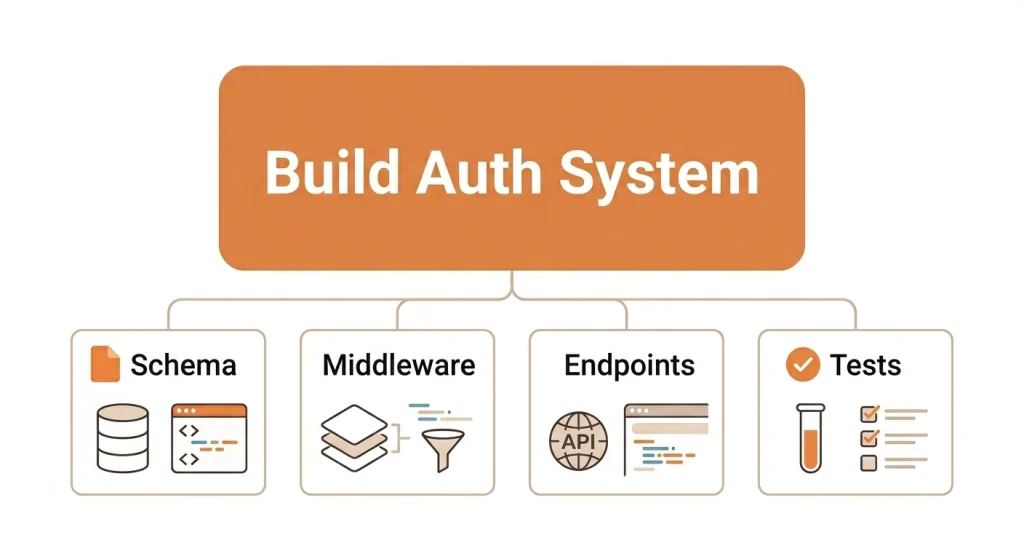
The better approach is to decompose the task and tackle each part in a separate, focused prompt.
Say you want to build a user authentication system. Instead of prompting: “Build me a complete authentication system with login, registration, JWT, and password reset” — break it into stages:
- “List the key components needed for a JWT-based authentication system in a Node.js/Express app. Keep it to 6–8 bullet points, no code yet.”
- “Design the database schema for the users table. Include fields for email, hashed password, refresh token, and timestamps. Return as a PostgreSQL CREATE TABLE statement.”
- “Write the Express middleware to verify a JWT on protected routes. Include error handling for expired and invalid tokens.”
- “Write the password reset flow — endpoint to request a reset link and endpoint to submit the new password. Use a short-lived token stored in Redis.”
Each prompt is small, direct, and easy to evaluate. If the middleware logic is off, you fix just that piece — you don’t throw away the entire authentication module. You also stay in control of the architecture rather than inheriting whatever the AI decided felt right.
This works across any complex engineering task. Building a new feature? Separate prompts for data model, API design, business logic, and frontend component. Debugging a tricky issue? One prompt to isolate the cause, another to explore solutions, another to write the fix with tests. Doing a code review? Break it by file or concern, not all at once.
The rule of thumb: if your task has more than two distinct steps, split it into separate prompts. You’ll get cleaner outputs, catch errors earlier, and produce something you’d actually want to ship.

Assign a Role to Get Better-Shaped Answers
Telling the AI to approach your task from a specific perspective dramatically changes the quality of the response.
Try opening with: “Act as a senior backend engineer reviewing this for production readiness…” or “You are a security engineer — identify any vulnerabilities in this authentication flow…” or “Respond as a tech lead explaining this architecture decision to a junior developer.”
The AI shifts its reasoning, vocabulary, and priorities to match that role. A security engineer will flag input validation gaps. A tech lead will weigh trade-offs. A senior reviewer will spot edge cases a first pass misses.
This isn’t a trick — it’s just giving the AI a more precise starting point. It narrows down the enormous range of possible responses to ones that actually fit your context.
Ask the AI to Draft First, Then Refine
One of the most underused prompting techniques is asking the AI to produce a rough version, evaluate it, and then improve it — all before you see the final answer.
It sounds counterintuitive. Why ask for two passes when you could ask for one? Because the first pass surfaces assumptions, edge cases, and design trade-offs that the AI can then self-correct. You get a more considered result than if the AI just fired off its first instinct.
This prompt works well:
“Draft an initial implementation of this API endpoint. Then review your draft critically — identify any missing error handling, security gaps, or performance concerns. Finally, write an improved version that addresses those issues.”
You can push this further for architecture or design decisions:
“Give me three different approaches to structuring the state management for this React app, evaluate the pros and cons of each given our stack, and then recommend the best one with your reasoning.”
This forces the AI to think through trade-offs before committing, rather than pattern-matching to the most common solution. The output at the end of that process is meaningfully different — more robust, more reasoned, and much closer to production-ready.
Understand When to Use Plan Mode vs Agent Mode
This is something most prompting guides miss entirely — and it matters a lot for how you structure your request.
Plan mode (also called think mode or extended thinking in some tools) is for when you want the AI to reason through a problem before giving you an answer. It’s best for architecture decisions, debugging complex issues, or any situation where getting the logic right matters more than getting a fast answer.
Agent mode is for execution. You hand the AI a goal and let it work autonomously — reading files, writing code, running searches, making decisions along the way. It’s faster, but you give up visibility into the reasoning.
The practical rule: use plan mode when you need to understand the solution or verify the logic — a tricky bug, a security review, a design decision. Use agent mode when the task is clear and well-scoped — scaffold this component, generate these unit tests, refactor this function to use async/await.
Using agent mode on a vague or architecturally sensitive brief leads to confident-looking code that makes the wrong assumptions. Using plan mode to generate a simple CRUD endpoint wastes time. Match the mode to the task.

Ask for Step-by-Step Thinking — With Checkpoints
For anything analytical, technical, or multi-layered, ask the AI to think through the problem step by step and pause for your input at each stage before moving on.
This prompt works well:
“Think through this step by step. After each step, pause and ask me if I’d like to continue, suggest corrections, or change direction before you move to the next step.”
This small addition changes everything. Instead of getting a fully baked solution you have to unpick, you get a collaborative process where you can catch a wrong assumption at step 2 — say, a misunderstood data model — rather than discovering it after the AI has built three more layers on top of it. It’s especially valuable for debugging, planning a new feature, or any task where an early misstep cascades into bigger problems.
Think of it as pair programming with AI — you stay in the loop at every turn, not just at the end.
What to Do When the AI Is Hallucinating
AI hallucination is when the model confidently states something that’s factually wrong. In engineering contexts this is particularly dangerous — a fabricated API method, a non-existent library option, or a plausible-looking but broken code pattern can cost hours.
Recognise the signs. If the AI references a specific library version, a framework API, a configuration option, or a third-party service behaviour you can’t immediately verify — check before you use it. Hallucinations often sound the most authoritative.
When you suspect something is wrong, say so directly and specifically:
- “I don’t think that method exists in Express 4.x — can you verify and show me the correct one?”
- “That React hook behaviour doesn’t match what I’m seeing in the docs. Walk me through where that’s coming from.”
- “This SQL query looks like it would cause a full table scan — can you reconsider and explain your reasoning?”
Calling out the specific claim gives the AI something concrete to revisit. It forces a re-examination of the logic rather than just a confident restatement of the same answer.
If the hallucination persists, change your approach. Break the question into smaller parts. Ask the AI to reason through the problem before giving code. Switch to plan/think mode. Or start a fresh conversation — a long debugging thread can drift, and a clean start with a more precise prompt often resolves it immediately.
For library APIs, framework behaviour, and version-specific details — always cross-check against the official docs. AI is a capable coding partner, not a substitute for documentation.
Tools That Help You Write and Refine Prompts
If you’re writing prompts regularly and want to sharpen them faster, a dedicated prompt tool can save real time. Here are the most useful ones:
PromptPerfect is one of the cleanest optimisers available. Paste in an existing prompt and it rewrites it for better clarity, specificity, and output consistency. Supports Claude, ChatGPT, and Gemini — useful when results keep coming out vague despite a reasonable brief.
PromptBuilder.cc suits people who generate and test prompts frequently. Compose, run, and save prompts in one place without switching tools. The free tier covers most solo workflows; paid plans add shared libraries and version history for teams.
Jotform AI Prompt Generator is the easiest free option with no login required. Pick your target model and it generates a structured prompt around your idea. Good for quick one-off tasks or when you need a better starting point fast.
Anthropic’s Prompt Library (at docs.anthropic.com/en/prompt-library) is worth bookmarking if you use Claude regularly. A curated collection of high-quality example prompts across coding, analysis, summarisation, and more — showing exactly how well-structured prompts are written. Free.
LangSmith is for developers and teams building AI-powered products. It handles prompt versioning, automated evaluation, and A/B testing at scale. If you’re deploying prompts in production — not just in chat — this is the category leader.
AIPRM is a Chrome extension that adds a community-built prompt template library directly inside ChatGPT. ChatGPT-only, but the template collection is useful for recurring development and content tasks.
For casual use, Jotform or Anthropic’s library is enough. For regular professional use, PromptPerfect or PromptBuilder.cc pays for itself quickly. For teams shipping AI-assisted workflows, LangSmith is worth the investment.

A Simple Prompt Template to Start With
If you want a quick starting point, this structure works for most engineering tasks:
“[Role/Stack context] — [Specific task] — [Exact output format] — [Constraints]”
For example: “I’m a backend engineer working on a Node.js/Express REST API using PostgreSQL. Write a function to paginate results from a users table. Return a clean JavaScript function with inline comments. Use limit/offset pagination, not cursor-based. No external libraries.”
You don’t need a 500-word prompt to get a great result. You just need the right ingredients.
Frequently Asked Questions
What makes a good AI prompt?
A good AI prompt is specific, provides context, and defines the expected output. For developers, this means naming your stack, the exact problem, the output format you want (code, explanation, pseudocode), and any constraints like libraries or conventions to follow.
Should I send one big prompt or break it into smaller ones?
Break it up. When a task has multiple steps — data model, API logic, frontend component, tests — tackle each in a separate focused prompt. You get cleaner outputs at each stage, catch wrong assumptions before they compound, and stay in control of the architecture throughout.
What’s the difference between Plan mode and Agent mode in AI?
Plan mode has the AI reason through a problem carefully before answering — best for architecture decisions, debugging, and security reviews. Agent mode lets the AI execute autonomously with less step-by-step visibility. Use plan mode when correctness matters most; agent mode when the task is well-scoped and you want speed.
What is an AI skills file or instructions file?
A saved block of context that loads automatically with every conversation. Instead of retyping your stack, conventions, and preferences each time, you write it once and the AI applies it permanently. Claude calls it Projects or custom instructions; ChatGPT has Custom Instructions in settings.
What should I do if the AI gives me wrong or fabricated code?
Call out the specific issue — the method name, the API behaviour, the logic error — and ask the AI to re-examine that exact point. If it persists, break the question into smaller parts, switch to plan/think mode, or start a fresh conversation. Always verify library APIs and version-specific behavior against official documentation.
Are prompt generator tools worth using?
Yes, especially if you write prompts regularly. Tools like PromptPerfect and PromptBuilder.cc save real time on iteration. For occasional use, Anthropic’s free Prompt Library is more than enough to see how well-structured prompts are written and adapt the patterns to your own work.