The first time I checked how much of my context window was gone before I typed a single word, I was genuinely surprised. Several MCP servers, each announcing every tool it had, and a noticeable chunk of my session budget was spent on introductions.
Now, if you are using an AI agent like Claude Code for your daily work, this matters more than it looks. Tokens are not just cost — they are the working memory of your agent. Every token spent on tool definitions the agent never uses is memory it cannot spend on your actual task.

So I sat down and compared the two ways I extend my agent: converting my documents and checklists into skills, versus connecting things through MCP. In this article, I’ll share the token math for skills vs MCP, when each one is the right choice, and the third option most people skip — moving the routine work out of the AI context entirely.
Table of Contents
What Are Skills and MCP?
Before the comparison, let’s get the two terms straight.
Skills vs MCP is the choice between two ways of extending an AI agent: skills are markdown instruction files that load into context only when the task needs them, while MCP (Model Context Protocol) connects the agent to external tools whose definitions load at the start of every session.
A skill is essentially a document with a job. You take knowledge the agent needs — your writing guidelines, a publishing checklist, a report format — and package it as a markdown file with a short name and description. I have written about this in detail in my guide on how to create AI agent skills.
MCP is different. It is a protocol which lets your agent talk to external systems — your database, your project management tool, a browser. The server exposes “tools”, and the agent calls them like functions. Powerful, but the power comes with a standing cost.
The Token Math: What Each Approach Actually Costs

Here is where the comparison gets interesting, because the two approaches spend tokens in completely different ways.
MCP tool definitions load into the context window at the start of every session, whether the agent uses them or not. A server exposing dozens of tools — names, descriptions, and full input schemas — can consume tens of thousands of tokens before you type your first prompt. That is overhead you pay on every single conversation, even the ones that never touch the server.
Skills work on a lazier principle, and I mean that as a compliment. At session start, the agent sees only each skill’s name and one-line description — typically 20 to 100 tokens per skill. The full instructions load only when the agent decides the skill is relevant to the current task. This pattern is called progressive disclosure, which simply means revealing detail only when it is needed.
So the same knowledge costs you a few dozen tokens on idle sessions as a skill, or thousands of tokens on every session as an always-loaded tool schema. Multiply that across the number of conversations you have in a month and the gap stops being academic.
Though, be fair to MCP here. The protocol has been improving, and newer clients load tool definitions more selectively than they did in the early days. The gap is narrowing. But the architectural default still favours skills for anything that is fundamentally a document.

Why I Convert Documents to Skills Instead of Reaching for MCP
My own test case was this blog. My editing guidelines — voice, structure, SEO checklist — used to live as a long document I pasted into conversations or stuffed into project instructions. Every session carried the full weight of it, relevant or not.
Converting it into a skill changed the economics completely. Now the agent carries a one-line description of the skill everywhere, and loads the full guidelines only when I am actually writing an article. When I am doing something else — fixing CSS, planning a series — that document costs me almost nothing.
Here is the pattern I now follow: if the thing I want to give my agent is knowledge, it becomes a skill. If it is access, it becomes MCP. A style guide is knowledge. A live connection to my WordPress database is access. Mixing these up is where most token waste comes from — people wrap static knowledge in an MCP server because MCP was the first extension mechanism they learned.
If you are new to this ecosystem, my getting started with Claude Code guide covers where skills and MCP servers live in a practical setup.
When MCP Is Still the Right Answer
I don’t want this to read as “MCP bad, skills good”, because that is not what my experience says.
MCP earns its token cost when the agent needs things a markdown file cannot provide. Live data is the obvious one — a skill cannot tell you what is in your inbox right now. Authentication is another – MCP has OAuth built into the spec, which matters the moment a connection involves user accounts and permissions rather than a local file.
There is also the maintenance angle. When an external API changes frequently, an MCP server maintained by the service provider stays correct on its own. A skill describing that same API goes stale quietly, and a stale instruction file can be worse than no instruction file.
So my honest rule: use MCP for live systems, real authentication, and fast-moving integrations. Just don’t let it be the default for everything.
What About a RAG-Based MCP for Documentation?

There is one MCP pattern that deserves separate treatment, because it flips the token math I described earlier in MCP’s favour.
A RAG-based MCP server stores your documentation in a searchable index and exposes a single search tool to the agent. RAG stands for Retrieval-Augmented Generation, which simply means the agent retrieves the relevant passages before it answers. Instead of loading documents into context, the agent asks a question and gets back only the few paragraphs that matter.
Look at what this does to the numbers. The standing cost is one small tool definition — a few hundred tokens, not dozens of schemas. Each query returns a slice of maybe 500 to 1,500 tokens, no matter how large the underlying documentation grows. A skill cannot make that promise. When a skill triggers, its full instructions load, so the cost scales with the size of what you wrote.
For my editing guidelines, a few thousand tokens per activation is nothing. But think about a product manual or an API reference running to hundreds of pages. Loading all of it into context is not just expensive — it usually is not possible at all. This is exactly where retrieval earns its keep: token cost stays flat while the corpus grows.
Token cost is not the only advantage, though. A vector index searches by meaning, not by matching words. Ask a RAG-backed server “how do I cancel my plan” and it will surface the passage about subscription termination, even when the two share no vocabulary. A skill has no such layer — the agent finds content in bundled files by literal text search, so if it greps for words your document never uses, it comes back empty-handed. For large documentation written by many people over many years, that semantic matching is often the difference between finding the answer and confidently missing it.
Though, be prepared for the tradeoffs, because RAG is not free lunch. You now own an indexing pipeline — chunking the documents, embedding them, and re-indexing every time they change. And retrieval is probabilistic. Sometimes the search misses the passage you needed, and the agent answers confidently from an incomplete picture. A skill is deterministic: I know exactly what the agent reads, word for word, because I wrote it.
So here is how I sort documentation between the two:
Small and curated (a few pages) — keep it as a skill. Guidelines, checklists, and brand rules must be followed exactly, and a skill guarantees the agent sees every word.
Large and sprawling (hundreds of pages) — put it behind a RAG-based MCP. Each task needs only a slice, and retrieval fetches just that slice.
Somewhere in between (10–50 pages) — try a skill with bundled reference files first. The SKILL.md carries a short map of what each file covers, and the agent opens only the file it needs. That is progressive disclosure two levels deep — a poor man’s RAG with zero infrastructure. Just know its limit: lookup relies on your file map and exact terms, so it works best when the naming and terminology stay consistent.
Changing every week — lean towards RAG with automated re-indexing. Hand-editing markdown to chase a moving API gets old fast.
Where the Industry Is Heading: Portable Knowledge
This debate is clearly bigger than any one tool, and the industry has started responding. In June 2026, Google announced the Open Knowledge Format (OKF) — an open specification that represents organizational knowledge as a directory of markdown files with YAML frontmatter, cross-linked into a graph. The pitch is that knowledge should be a format, not a platform: anyone can produce it without an SDK, and any agent can consume it without an integration.
I find the shape of it telling. Google’s answer to scattered documentation is not a bigger vector database — it is structured, cross-linked markdown, which looks remarkably like a well-organized skill bundle. The format even expects agents to do the housekeeping, because an LLM does not get bored updating cross-references across fifteen files in one pass.
So the two approaches converge rather than compete. A portable markdown bundle can be handed to an agent directly, skill-style, while it is small — or indexed behind a RAG-based MCP for semantic search once it outgrows that. Author the knowledge once in an open format, and the delivery mechanism becomes a deployment detail you can swap later. That is the direction I would bet on: own your knowledge as plain files, and stay flexible about how agents reach it.

Not Sure Which to Pick? Start with a Skill and Grow from There
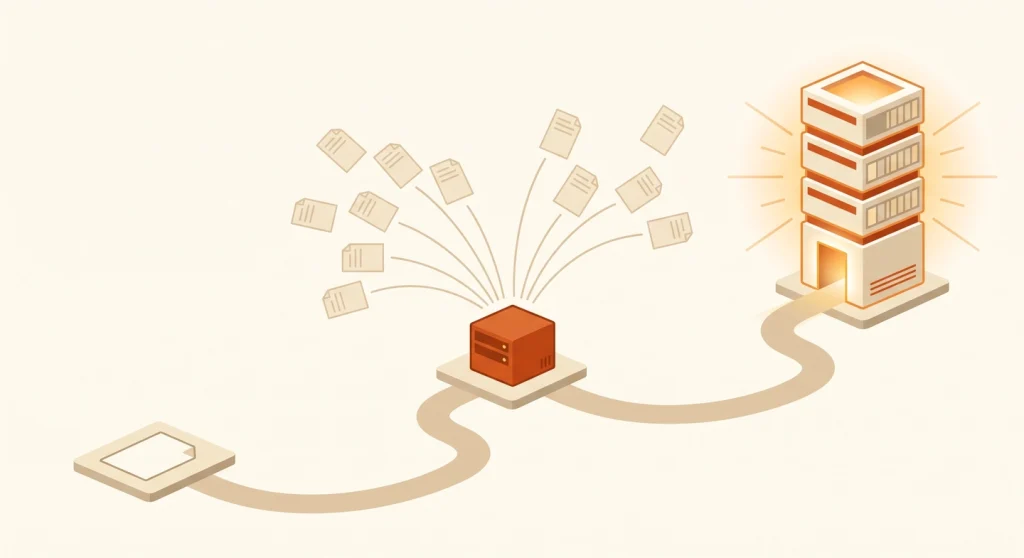
If all these options feel like a decision you are not ready to make, here is the good news: you don’t have to make it upfront. The migration path between them is smooth, because the underlying asset — your knowledge in markdown — never changes. Only the delivery layer does.
This is the progression I would recommend to anyone starting today.
Step 1: Start with a skill and reference files
Write your knowledge as a skill with bundled reference files. Zero infrastructure, nothing to host, and it works the same day. More importantly, this step forces the discipline that pays off later: breaking your knowledge into focused, well-named markdown files with clear descriptions. That curation work is the real investment, and it carries forward untouched.
Step 2: Serve the same files through MCP when others need them
The moment your knowledge needs to reach beyond your own machine — a teammate’s agent, a different AI tool, a shared workflow — put the same markdown files behind a simple MCP server. Nothing gets rewritten. The server just becomes the distribution point, which gives you central updates and access control while every consumer reads from one source of truth.
Step 3: Add a vector layer when the corpus outgrows lookup
When the collection grows past the point where file names and exact terms can find things reliably, index those same markdown files into a vector store and let the MCP server answer semantic queries. Your knowledge base becomes a RAG-based MCP without a single document being converted, because markdown is exactly what indexing pipelines want as input.
Notice what stays constant across all three steps. The markdown is the asset; skills, MCP, and RAG are just delivery. So the only decision you must get right on day one is to start writing your knowledge down in plain, portable files — which is precisely the bet Google is making with OKF, and honestly, the cheapest bet in this whole article.
The Bigger Win: Move Regular Work Outside the Context Window

Now, here is the part I find most people miss entirely. The skills vs MCP debate is really a symptom of a bigger question: how much work are you routing through the model’s context that never needed to be there?
Every intermediate step an agent processes in context costs tokens. If your agent fetches 500 rows of data, reads all of them in context, filters them down to 5, and reports back — you paid for 500 rows of thinking. A script could have done the filtering outside the context window and handed the agent just the 5 rows that matter.
Anthropic’s engineering team demonstrated exactly this. By moving an agent workflow into code execution — letting scripts do the fetching, filtering, and transforming — they reduced token usage from 150,000 tokens to 2,000 tokens, a 98.7% saving. The full breakdown is in their code execution with MCP post, and it is worth reading in full.
This reframed how I build my own workflows. The question I ask now is not “skill or MCP?” but “does the model need to see this at all?” Repetitive, deterministic work — resizing images, validating front matter, generating boilerplate, moving files — belongs in scripts the agent can run. The agent’s context should hold judgment calls, not plumbing.
In practice, a skill that bundles a script is the best of both worlds. The markdown tells the agent when and how to use it, the script does the heavy lifting outside context, and only the result comes back. Small instruction, big leverage.
How Do You Choose Between a Skill and an MCP Server?
The best way to choose between a skill and MCP is to ask what you are actually giving the agent. Choose a skill when you are packaging knowledge — instructions, checklists, templates, or converted documents. Choose MCP when the agent needs live access to an external system. And if a script can do the job deterministically, use neither — let the agent run the script.
Here is the comparison in one table:
| Question | Skill | MCP server | Script / automation |
|---|---|---|---|
| What it provides | Knowledge and instructions | Live access to external systems | Deterministic execution |
| Idle token cost | ~20–100 tokens (name + description) | Full tool schemas, every session | Zero — only output enters context |
| Best for | Style guides, checklists, converted documents | Real-time data, OAuth, fast-changing APIs | Repetitive, rule-based work |
| Maintenance | You update the markdown | Provider updates the server | You update the code |
| Weakness | Goes stale silently | Standing context overhead | No judgment — needs exact rules |
Start every new integration at the right-hand column and move left only when you need to. Scripts first, skills for knowledge, MCP for access. Your context window will thank you.
Skills vs MCP is not really a war — it is a sorting problem. Knowledge goes into skills, access goes through MCP, oversized documentation goes behind retrieval, and the routine work should leave the context window altogether and live in scripts. Take one document you keep pasting into your AI conversations and convert it to a skill this week; the token math will make the rest of the argument for you.
Frequently Asked Questions
Do skills use fewer tokens than MCP?
Skills use fewer tokens than MCP in most setups because they load progressively. Only a skill’s name and short description sit in context by default, while MCP tool definitions and schemas load at session start. The full skill content loads only when the agent actually needs it for the current task.
Can skills replace MCP servers completely?
Skills can replace MCP servers only when no live connection is needed. Static knowledge — instructions, templates, documented API usage — works well as a skill. Anything requiring real-time data, authentication, or actions on an external service still needs MCP or a script with proper credentials.
What is progressive disclosure in AI agents?
Progressive disclosure is a loading pattern where an AI agent sees only a short summary of available capabilities and pulls in full detail on demand. It keeps the context window lean, because unused instructions never consume more than their one-line description.
How do I convert a document into a skill?
Converting a document into a skill means restructuring it as a markdown file with a name, a one-line trigger description, and the instructions as the body. Trim anything the model already knows, keep the trigger description specific, and bundle scripts for any deterministic steps the document describes.
Should I use a skill or a RAG-based MCP for documentation?
A skill is better for documentation you author and can keep small — guidelines, checklists, and curated how-tos where the agent must see every word. A RAG-based MCP wins when the documentation runs to hundreds of pages and each task needs only a small slice. Retrieval returns just the relevant passages, and its vector layer matches questions by meaning rather than exact wording, so token cost stays flat as the docs grow.
When should I use a script instead of a skill or MCP?
A script is the right choice whenever the task is deterministic — the same input should always produce the same output. File conversions, validation, data filtering, and formatting are script territory. It costs zero context tokens while running; only the output the agent reads counts.