I’ve been using AI tools daily for over a year now. For most of that time, I treated them like a search box — ask a question, get an answer, move on. That changed on a Monday morning with Google Analytics open in one tab and Search Console in another. I’d been running the same twenty-minute check by hand every week for months. Which pages dropped. Which ones spiked. What quietly broke.
That’s when agents clicked for me. Not the science fiction version. Not the autonomous robot that replaces your job. The practical version — an AI that pulls last week’s traffic, finds the three pages that fell off a cliff, works out why, and hands me a fix list before I’ve finished my coffee.

This guide covers what agents actually are (without the hype), how agentic workflows differ from regular AI prompting, the real difference between agents, skills, and MCP servers, and — most importantly — how to set hard guardrails so your agent does exactly what you want and nothing more.
This is Part 9 of my AI-Powered Blogging series, and it’s where the last two parts meet. Skills taught the agent how to do a job. MCP servers gave it the means to act on the outside world. Agents are what decide when to use either.
What Is an AI Agent?
An AI agent is a software system powered by a large language model that can independently plan tasks, make decisions, and take actions using external tools to achieve a goal. Unlike a basic chatbot that responds to one prompt at a time, an agent reasons through multi-step problems and adapts its approach based on results.
The key word there is “independently.” When I ask ChatGPT what a bounce rate means, that’s a single prompt-response cycle. Question in, answer out.
Now point an agent at your GA4 property instead. It pulls last month’s sessions, compares them against the month before, isolates the pages that lost the most traffic, then cross-checks each one against Search Console before handing you a ranked list of what to fix. I never told it to open Search Console. It worked out that was the sensible next step.
Agents don’t just generate text. They think, then act, then evaluate. That loop is what separates an agent from a fancy autocomplete.
How to Think About Agents

Here’s the mental model that helped me most. Forget robots. Think of an agent as a new team member you’re onboarding.
You wouldn’t hand a new hire the entire company manual on day one and say “figure it out.” You’d give them a clear role, specific responsibilities, the tools they need, and boundaries on what they should and shouldn’t touch. Good agents work the same way.
Three things define an agent:
- A goal. Not a vague instruction — a concrete outcome. “Compare last month’s GA4 sessions to the previous month, list the ten pages with the biggest drop, and flag a likely cause for each” is a goal. “Look at my analytics” is not.
- Tools. An agent without tools is just a language model generating text. Tools let agents read files, search the web, run code, query databases, and interact with external services. The tools you give an agent determine what it can do.
- Autonomy with boundaries. This is where most people either give too much freedom or too little. An agent that can’t make any decisions on its own is just a chatbot with extra steps. An agent that can do anything without checks is a liability. The sweet spot is controlled autonomy — let it work independently within the guardrails you set.
The quality of your instructions matters enormously here. Vague prompts produce vague agent behaviour, just like vague job descriptions produce confused employees. Everything from Part 2 of this series on how to write better AI prompts still applies — an agent just multiplies the consequences of a sloppy brief across ten steps instead of one.

What Makes a Workflow “Agentic”?
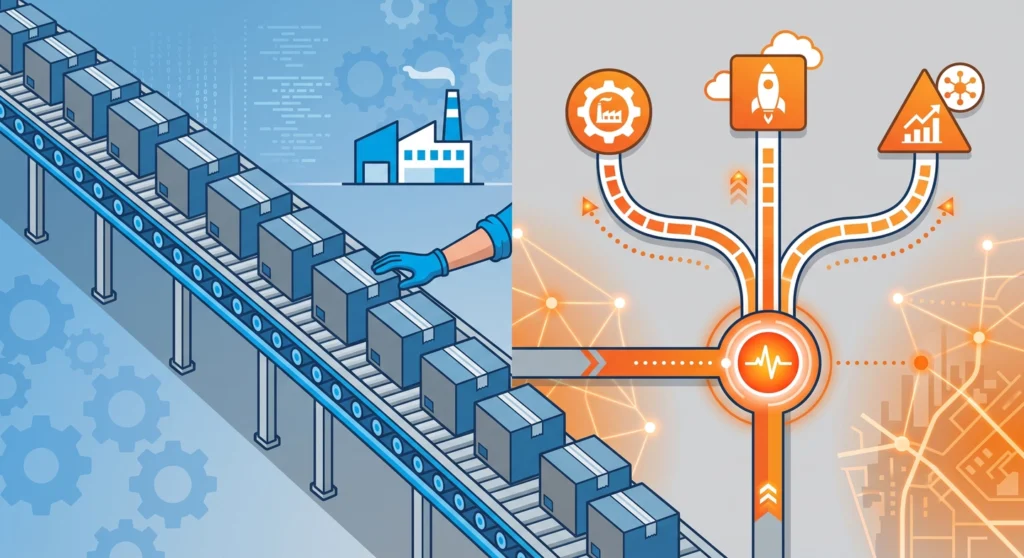
Not every AI-powered process is an agentic workflow. The word “agentic” specifically means the AI is making decisions about what to do next — not just following a fixed script.
Traditional automation works like a conveyor belt. Step one feeds into step two, which feeds into step three. If something unexpected happens at step two, the whole thing breaks. There’s no reasoning involved.
An agentic workflow works more like a human problem-solver. The agent receives a goal, breaks it into steps, executes each step, evaluates the result, and adjusts its plan if something doesn’t work. This plan-execute-evaluate loop is what makes it genuinely different.
| Feature | Traditional automation | Agentic workflow |
|---|---|---|
| Decision-making | None — follows fixed rules | AI reasons and decides at each step |
| Error handling | Fails or follows a pre-set fallback | Adapts and retries with a different approach |
| Tool usage | Hardcoded into each step | Agent selects tools based on the task |
| Flexibility | Only handles anticipated scenarios | Handles unexpected situations within its scope |
| Human involvement | Required for any deviation | Only needed for high-risk or ambiguous decisions |
Here’s a real example from my own site. Every Monday I run a traffic review workflow. One instruction: check last week against the week before and tell me what needs attention.
The agent pulls session and engagement data from GA4, ranks pages by the size of their drop, and then decides what to do next based on what it finds. If a page lost traffic but held its engagement time, it goes and checks Search Console for a ranking slip. If traffic stayed flat but engagement time collapsed, it fetches the page itself and hunts for what changed — a broken embed, an image that stopped loading, a rewritten intro that buried the answer.
That branching is the agentic part. A traditional script would run the same five queries every week and hand me the same five charts. The agent follows the evidence.
Every agentic workflow relies on three core components working together:
- Planning. The agent breaks a high-level goal into specific sub-tasks. Good planning depends on clear context — which is why how you feed the AI information matters as much as what you ask it to do. That’s the progressive disclosure principle from Part 4, and agents lean on it harder than anything else in this series.
- Execution. The agent carries out each sub-task, calling the tools it needs along the way. This might mean reading a file, running a command, fetching a web page, or writing output to disk.
- Refinement. After each step, the agent evaluates the result. Did the report come back empty? Is a 90% drop a real problem or just a date range that included a public holiday? If something looks off, it adjusts before moving to the next step.
Agents, Skills, and MCP — What’s the Difference?

This is the question I see most often, and the confusion is understandable. All three — agents, skills, and MCP servers — work together, but they solve different problems.
Agents are the decision-makers. An agent has a goal, a plan, and the autonomy to work through it. Think of the agent as the brain.
Skills are reusable instruction packages. They’re Markdown files stored on disk that teach an agent how to perform a specific task — like running a traffic audit, reviewing code, or building a spreadsheet. Skills don’t do anything on their own. They activate when the agent detects a relevant request and provide the knowledge and rules the agent needs to do the job well. If you want the deep dive on building them, I covered the full process in how to create AI agent skills.
MCP (Model Context Protocol) servers are the hands. They’re external services that give the agent the ability to actually do things — query a database, send an email, fetch a web page, pull an analytics report. MCP is an open protocol that standardises how AI tools connect to external systems, the same way USB standardises how devices connect to computers.
Google maintains an official Google Analytics MCP server that does exactly this for GA4. It wraps the Analytics Data API so an agent can ask questions of your property in plain language instead of hand-building API calls.
One detail is worth pausing on. Google ships it read-only — it can pull reports, but it cannot change a single setting in your Analytics configuration. That’s a deliberate design decision, and it’s the same decision you should be making about your own agents. If you haven’t connected one of these before, I walked through the whole process in how to set up MCP servers.
Here’s how I think about the relationship:
| Component | Role | Analogy |
|---|---|---|
| Agent | Plans and decides | The employee |
| Skills | Provides domain expertise | The training manual |
| MCP servers | Connects to external tools | The company toolkit |
When I run my Monday traffic review in Claude Code, here’s what’s actually happening. The agent receives my request and activates my analytics-review skill, which holds my rules — which metrics I care about, what counts as a real drop versus normal week-to-week noise, how to rank findings so the important ones surface first. The agent then uses MCP tools — the Google Analytics server, web fetch, file system access — to pull the data, inspect the pages, and write the report.
None of these three works well in isolation. An agent without skills is a generalist with no domain knowledge. An agent without MCP tools can only generate text — it can’t interact with anything. Skills without an agent are just files sitting on disk, doing nothing.
The practical distinction matters for one more reason: token efficiency. Skills use progressive disclosure — they only load their full instructions when activated, keeping the idle cost to around 50 tokens. MCP tools work differently, and the difference in what they cost you at rest is bigger than most people expect. I ran the numbers on my own setup in Skills vs MCP: the token math that changed my AI setup, and the token habits from Part 3 matter more here than anywhere else — an agent that loops through fifty tool calls spends fifty times what a single prompt does.

From Analytics to Action: What a Correction Loop Looks Like
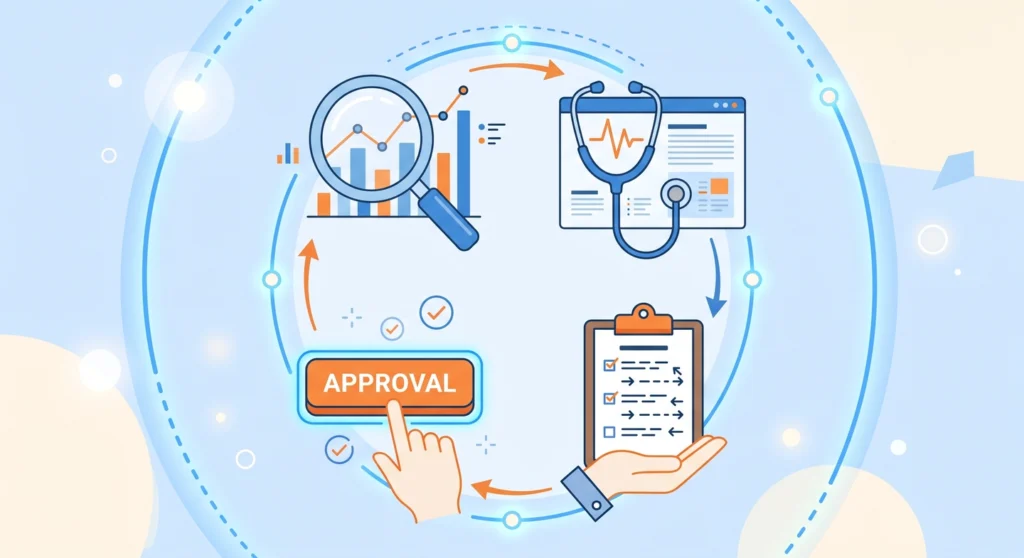
Reading the data is the easy half. The interesting question is what the agent does once it has found the problem.
This is where the read/write boundary matters. The Analytics MCP server is read-only, so the correction never happens inside Analytics. The agent reads there and acts somewhere else — your CMS, your redirects, your internal links, your content files.
Here’s the loop I actually run, and where I sit in it.
1. Detect. The agent pulls GA4 data and flags anything outside normal variance — a page down 40% week on week, a landing page whose engagement time halved, a referral source that vanished overnight.
2. Diagnose. It investigates each flag. A 404 spike usually traces back to a broken internal link or a slug I changed without adding a redirect. A collapsed engagement time on one post often means something broke in the layout. Falling sessions with stable rankings normally points at a title or meta description that stopped earning the click.
3. Propose. The agent writes up what it found and what it wants to change — the specific redirect to add, the meta description to rewrite, the internal link to fix. Every item arrives with the evidence behind it.
4. Act, with a gate. Low-risk fixes I let it make directly, like correcting a broken URL in my content files. Anything that touches the live site waits for my yes.
Step four is where people get nervous, and they should. An agent with write access to a live WordPress site and a bad reading of the data can do real damage in seconds. So I split the difference — detection and diagnosis run unattended, the fix list lands in a file, and I approve changes in batches.
What surprised me is how much value sits in the first three steps alone. The agent surfaced a handful of orphaned posts I’d genuinely forgotten existed — steady impressions, no internal links pointing at them, engagement good enough to justify far more traffic than they were getting. I’d never have gone looking for those. If you want a sharper triage signal than raw pageviews, the content engagement score I built works well as the metric an agent ranks against.
One honest caveat. The agent is only as good as the story your data tells, and analytics data lies more often than people admit. A bot wave, a mis-fired tag, a date range straddling a holiday — all three produce dramatic drops that mean nothing. I’ve had the agent confidently diagnose a “traffic collapse” that turned out to be a tracking script I’d broken myself. Which is exactly why the human gate stays.
How to Design Your First Agentic Workflow

Building an agentic workflow doesn’t require a framework or a computer science degree. Here’s the process I follow.
Step 1: Define the Goal Clearly
Write down what the agent should accomplish in one sentence. “Pull last week’s GA4 data, compare it to the week before, and list every page that lost more than 20% of its sessions with a likely cause for each” is clear. “Keep an eye on my analytics” is not.
Step 2: Map the Steps
List every step a human would take to complete the task. This becomes your workflow skeleton. Don’t worry about tools yet — just get the steps right.
Step 3: Assign Tools to Each Step
For each step, identify what the agent needs. Query an analytics property? Fetch a live page? Write output to disk? This tells you which MCP servers to connect and which skills to build. It also tells you what to leave out, which matters just as much.
Step 4: Write the Instructions
This is where skills come in. Write clear, specific instructions for each stage of the workflow. Include the rules, constraints, and quality standards the agent should follow.
Step 5: Test and Refine
Run the workflow end to end. Watch where the agent stumbles. Unclear instructions? Tighten them. Wrong tool being selected? Adjust the descriptions. I typically go through three or four rounds of refinement before a workflow runs smoothly.
The biggest mistake I see people make is jumping straight to step five without doing step one properly. A well-defined goal solves half your problems before you write a single instruction.

Setting Guardrails That Actually Work
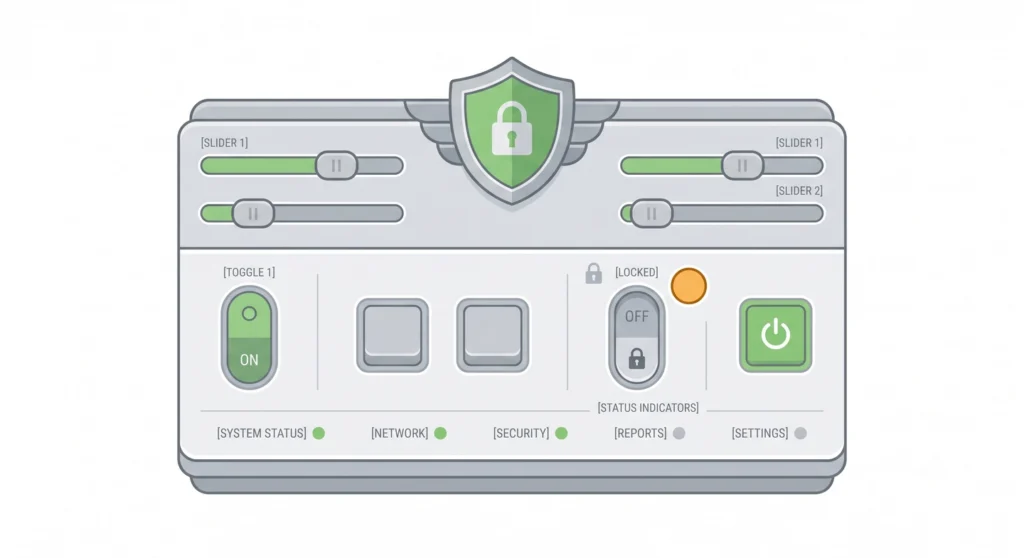
This is the section I wish existed when I started. Agents are powerful, but power without control is a problem. Guardrails are not optional polish — they’re the foundation of a trustworthy agentic workflow.
The Principle of Least Privilege
Give the agent the minimum permissions it needs. Nothing more. If your workflow reads analytics and writes a report, the agent has no business holding permission to publish posts, delete files, or send emails. Start with everything locked down and open permissions only as you need them.
Google made this decision for you on the Analytics side by shipping its MCP server read-only. Nobody is making it for you on the WordPress side, so make it yourself.
Part 6 of this series covered the config files that hold these boundaries — CLAUDE.md, AGENTS.md, and the rest. Everything in that article applies to agents, with one change in stakes. A guardrail in a coding project stops a bad edit. A guardrail on an agent with API access stops a bad edit that ships to a live site at three in the morning while you’re asleep.
Permission Tiers
I think about agent permissions in four levels:
| Risk level | Action type | Approval |
|---|---|---|
| Low | Read files, query analytics, search the web | Auto-approved |
| Medium | Write a local report, edit draft content | Logged, usually auto-approved |
| High | Run shell commands, call external APIs | Requires confirmation |
| Critical | Update live pages, delete files, push to production, send messages | Always requires explicit approval |
Most AI coding tools like Claude Code already implement something like this. When you run Claude Code, it asks for your permission before executing shell commands or writing to files outside the project. That’s a guardrail in action.
Making an Agent Read-Only
Sometimes you want an agent that can only observe and report — never modify. This is useful for code review, research, or monitoring workflows.
In Claude Code, you can enforce this by setting the permission mode. Running the agent with --permission-mode ask means every action requires your approval. For a truly read-only setup, you can configure the allowed tools list to include only read operations — file reads, web searches, web fetches — and exclude all write, edit, and shell execution tools.
Here’s a practical example. When I first set up my traffic review, I ran it fully read-only — GA4 queries and page fetches, nothing else. No file writes, no shell commands.
It printed its findings to the terminal and that was the end of it. I wanted to watch it work for a few weeks before trusting it with anything that leaves a mark. Once the diagnoses were consistently right, I opened up exactly one permission: writing a report file into a single folder.
That’s the pattern I’d suggest for anything that touches work you care about. The agent earns write access — it doesn’t start with it.
Default-Deny Architecture
This is the single most important guardrail principle. If a tool isn’t explicitly allowed, the agent cannot use it. Don’t rely on the AI’s judgment to decide what’s safe — define the boundary yourself and let the system enforce it.
Think of it like a firewall. You don’t configure a firewall by listing everything that’s blocked. You block everything by default and then open specific ports. Same logic applies to agent permissions.
Cost Controls
Agents that call tools in a loop can burn through tokens fast. Set maximum iteration limits, cap the number of tool calls per run, and monitor usage. Most frameworks support budget limits — use them.
There’s a second budget people forget: the API on the other end. Analytics APIs enforce their own request quotas, and an agent that decides to pull a report for every one of your 300 URLs individually will hit that ceiling and start failing halfway through the job. Scope the query before you scope the agent.
Getting Started Without Overwhelm

If this feels like a lot, start small. Pick one repeatable task — the weekly analytics check, a broken-link sweep, a monthly content audit — and build an agentic workflow for just that one thing.
The weekly analytics review is a good first candidate for a reason. It’s genuinely repetitive, the data is already sitting in an API, and the read-only default means the worst case is a wrong answer rather than a broken site.
Don’t try to automate everything at once. One well-built workflow that saves you an hour a week is worth more than ten half-finished ones that don’t work reliably.
I’ve deliberately kept this article at the level of principles — what agents are, how the loop works, where the boundaries go. In the final part of this series I’ll build one from nothing: an SEO research agent that takes a keyword, reads the top ten results, and tells you which topics an article has to cover to compete. Writing the skill, wiring the MCP servers, setting the permissions, and everything that breaks on the first run. Theory here, hands dirty there.
Worth saying plainly, since it comes up every time I write about this: that agent does the reading, not the writing. It hands you a research brief. You still write the article.
The agents are ready. The tools exist. The only piece that matters now is how clearly you can define what you want done — and how tightly you control what the agent is allowed to do.
FAQ’s about Agentic Workflow
What is an agentic workflow?
An agentic workflow is an AI-driven process where an autonomous agent plans tasks, makes decisions, and executes multi-step actions using external tools — all with minimal human intervention. Unlike traditional automation that follows fixed rules, agentic workflows adapt dynamically based on the results of each step.
How is an AI agent different from a chatbot?
AI agents plan, act, and evaluate in a continuous loop, using external tools to accomplish multi-step goals. Chatbots respond to individual prompts with no memory of a broader plan and no ability to take real-world actions like reading files, running code, or calling APIs.
What is the difference between MCP and AI agent skills?
MCP (Model Context Protocol) provides tool access — it connects agents to external services like databases, web search, or file systems through a standardised interface. Skills provide domain knowledge — they’re instruction files that teach agents how to perform specific tasks with specific rules and quality standards. MCP handles the “doing,” skills handle the “knowing.”
Can an AI agent analyse my Google Analytics data?
AI agents can analyse Google Analytics data by connecting to GA4 through an MCP server, which lets them query reports the same way you would in the interface. A well-built agent goes further than reporting — it compares periods, isolates the pages that lost the most traffic, and investigates the likely cause of each drop before handing you a fix list.
Can an AI agent change my Google Analytics settings?
Google Analytics MCP server access is read-only, so an agent connected through it can query your reports but cannot edit your property configuration, goals, or filters. Any corrective action happens outside Analytics — in your CMS, your redirects, or your content — which is where you should be setting write permissions carefully.
How do I make an AI agent read-only?
Restrict the agent’s tool permissions to read-only operations — file reads, web searches, and web fetches — while excluding all write, edit, delete, and execution tools. Most AI coding tools support permission modes or allowlists that enforce this boundary at the system level, not just through prompt instructions.
Are AI agent guardrails really necessary?
Guardrails are essential, not optional. Without them, an agent could overwrite live content, delete files, make unintended API calls, or burn through your token budget in minutes. The risk is sharpest when an agent acts on analytics data, because bot traffic and broken tracking produce convincing false alarms. The principle of least privilege prevents a wrong diagnosis from becoming a wrong edit.